There are still some spots in the December #ProjectPLN!
It’s not too late! There is still time to contribute to the December issue of Project PLN. I think this is going to be the most fantastic issue ever!
Integrating technology in the classroom
It’s not too late! There is still time to contribute to the December issue of Project PLN. I think this is going to be the most fantastic issue ever!
How to integrate Maxwell for Google SketchUp into the classroom: Maxwell takes student work in Google SketchUp and polishes it up to a professional level. Truly, the results are akin to what the professionals turn out! The SketchUp/Maxwell combination are wonderful for graphic art classes, math and geometry modeling, advertising lessons, engineering classes, architecture, science models, etc.
Don’t let the impressive results fool you, I’ve had 3rd grade students who made some amazing models using SketchUp. I look forward to introducing them to the Maxwell plugin so that students can see their work come to life in ways that they couldn’t do before.
At Anastasis Academy, we have several students from 2nd through 8th grade who are extremely interested and passionate about architecture. Google SketchUp is where I send them! Students can plan, create and build. Maxwell will allow them to visualize their creations in totally new ways.
I don’t understand why more schools don’t put these types of tools in the hands of students more often. Exposing students to tools like this, gives them the opportunity to explore their passions and interests. The tools are getting easier and easier to use and the number of tutorials is astonishing. You (the teacher) don’t have to know how to use these tools inside and out, your job is to let your students know they exist, and help them find the resources to use them. No excuses!
Tips: Using rendering tools teaches students about materials, light sources, shadows, etc. Use Maxwell to teach students these science concepts!
Please leave a comment and share how you are using Maxwell for Google SketchUp in your classroom!
How to integrate Admongo into the classroom: Advertising is all around us, Admongo helps students identify the ads that they are surrounded by every day and prompts them to think deeply about the purpose and aim of advertising. Students at Anastasis are currently completing an inquiry block all about advertising. A look at advertising can introduce students to persuasive writing, the effect of different music, colors and mediums, critical thinking and problem solving.
I like to have students to consider both sides of advertising. First, what does it mean to be a consumer and how does advertising play into that? Second, how would you create an advertisement that reaches a target audience? Advertising asks students to carefully consider their audience, the objective, and the tools that they use to spread a message. You can also tie advertising to history by asking students to look at World War II posters. Students can analyze the purpose of the poster, the call to action, the colors used, the intended audience and the message being “sold”. Students will need to do some digging to find out why the posters were successful and what events were occurring that made the posters necessary. After students explore actual World War II posters, they can plan and create their own.
There are so many places to go with an advertising unit and Admongo is a great starting point. Students can go through the game independently on computers or use an interactive whiteboard/projector-connected computer to take turns navigating through the game. Stop and discuss each question that pops up as a class.
Tips: Be sure to check out the “Teacher” section for lesson plans, print materials and videos.
Please leave a comment and share how you are using Admongo in your classroom!
It’s here, it’s here! The November issue of Project PLN is finally finished (thanks to many of you!) and ready to share.
We are excited about the November issue of Project PLN because it is full of feel-good stories about the amazing things that are happening in schools around the world. We have a great collection of stories that will have you inspired and thankful to be a part of this thing we call education. Take a look at the stories in the new issue, leave a comment for those who contributed and feel free to share your own stories on Twitter using the hash tag #SchoolDidaGoodThing
At Anastasis, we had a few students share what good things they saw happening at school, it is always great to have the kids perspective! Be sure to check out that post in Project PLN this month!
For the December Issue, we want to do something AWESOME. We want to hear from students from across this country and around the world. Educators, politicians, parents and many more have been doing a lot of talking about what schools should look like to best serve students. Well, we had the crazy idea of actually asking the students what they would want their school to look like if they could design it! These can be group projects or a collection of smaller projects. If you send it, we will publish it.
I did this project with students a few years ago and it was really neat. Amazing things happen when you ask for student input!
Using this Google Doc, please sign up for the grade level you teach and have your students draw, write, film, animate, etc what they want in their dream school. In all, we would like to have 13 posts representing K-12.
We would love to have all submissions by Monday December 19 so we can put them up for Tuesday December 20th before the Holidays get the best of us.
You may be wondering (or not) where the daily posts have been lately. Believe me, it isn’t for lack of tools to share! The slowness here is directly related to the time I am spending starting a school…as it turns out it is quite a bit of work! 😉 If you are a reader of all of my blogs, you have already seen this one, but for those of you who only follow me here, I thought I would give you a peek into the school I started this year.
Below, I share a picture of an incredible morning we had at Anastasis Academy where we welcomed singer/song writer Matthew West to join us for our morning devotion…we had NO idea it would result in the incredible private concert that it did. What an enormous blessing to have Matthew share his time, creativity and passion with us. Check out video of the morning on our school blog Stand Again.
|Kelly Tenkely|
It’s a pretty incredible thing to see dreams come to fruition.
For me it started with an obsession and passion for creating rich learning environments where every student was recognized as an individual. In that first post I wrote:
“I have a dreams of education. I have dreams of the way that schools should look. I have dreams of kids who find their passions. I have dreams of schools as rich learning centers.”
I had dreams of stripping the “vanilla” away so that passions could emerge.
Dreams of ditching that boxed curriculum that we call an education and watching the factory model fade into the rear-view mirror.
Dreams of ending the practice of viewing teachers (and students) as expendables.
I had dreams of schools that were beautiful, that were designed with students in mind.
Dreams that education would stop looking so much like the McRib.
Dreams of breaking free of the box, of valuing students and teachers, of using the right tools, of a school where a student’s inner da Vinci can break through, of a school that customizes learning.
I shared dreams of more fabulous failures.
The dreams started trickling into reality in March of this year (2011). In March I started getting some hints that these dreams weren’t really all that far-fetched. By May I had officially started a school. In August we opened the doors to Anastasis Academy with our first 50 students in 1st through 8th grade and had hired a dream team of 5 truly incredible teachers to lead them. In four short months we went from dreams to reality.
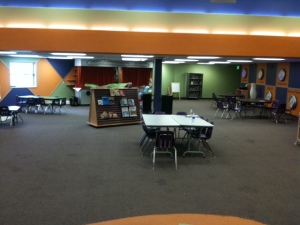
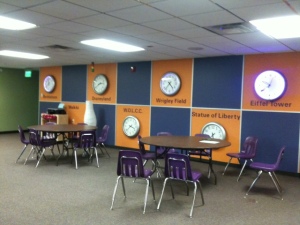
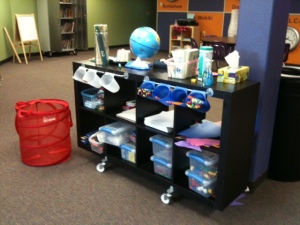
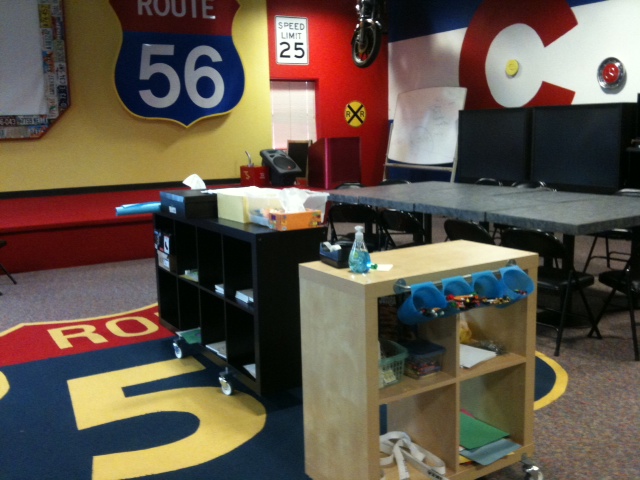
At Anastasis Academy, we lease space from a church building throughout the week. We have our own wing with classrooms, a playground, a gym and a kitchen. All of our furniture is on wheels. This makes it easy to adjust space daily based on needs, it is also a necessity since we use shared space. Twice a week we move all of our belongings across the hall into a storage room (if I’m honest, this is the part we could do without!). We can’t complain about the space. It is pretty incredible!
You will notice that we don’t have rows of desks. No teacher’s desk either. We have space that kids can move in. Corners to hide in, stages to act on, floors to spread out on, cars to read in. We are learning how to learn together, learning how to respect other children’s space and needs, learning how to discipline ourselves when we need to, learning how to work collaboratively, we are learning to be the best us.
You won’t see a worksheet at Anastasis. We use iPads. That isn’t to say that we ONLY use iPads, in fact, you’ll often see us building, cutting, pasting, writing on a whiteboard/chalkboard and even paper. We do a lot of blogging, a lot of reflecting, a lot of Evernotting, a lot of cinematography, a lot of discussing.
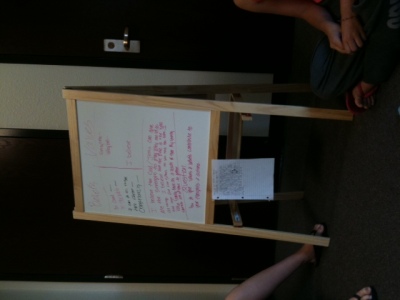
Every morning we start with a 15 minute walk outside together…as a community. We invite parents and siblings to be a part of our morning walk. Occasionally we have the dogs join in on the fun. After the walk we come inside as a whole-school for a time of devotions. Again, this is a time for us to build community, to foster the culture we want for our school. Families are invited to join us every morning. We always have at least one family and, many times, multiples. We pray with each other and for each other. We have hard conversations and funny conversations. We think together and challenge each other.
Our inquiry block is a time for hands-on transdisciplinary learning. This is my VERY favorite time to walk through classrooms. It is incredible to see the joy in discovery. It is incredible to have a second grade student with dyslexia discover an app to make stop motion animations, teach himself how to use it and proceed to stand up before 7th and 8th grade students to explain how stop motion works. I wish I could bring you all through the building during this time. Every time we have a visitor the students pause long enough to describe what they are doing, the learning that is happening. I often have to pick my jaw up off the floor. These kids are amazing.
We have no curriculum. At all. Zip. What did we do instead? We hired the very BEST teachers we could find. We gave them a base level of skills that we wanted students to have- an outline if you will. We used the Common Core Standards as our baseline. We don’t use the standards like most schools do. We use them to make sure that our students have the building blocks and foundations of learning in place. And then we let our students and teachers GO. The standards are not a weight we are tied to, they are the underpinnings that make it possible for us to soar and take our learning anywhere. When you look at the Common Core standards they are pretty underwhelming. I’m glad they are! They provide us with just enough momentum to propel us forward and then off we go on a journey of learning! We also have our big inquiry questions in place. From there, we go where the learning takes us, bunny trails and all. It is pretty fantastic. Today one of our primary students came out to see me and said, “Look at this boat I found in this new library book. Can I try to make it?” My answer: “Absolutely! What materials do we need?” Together we made a list of all the materials I needed to pull together for him. Tomorrow he will build that boat he is fascinated with and find out if it works the way he has planned. That is learning! Tell me what boxed curriculum allows time for that to happen? None. That is why we don’t have it.

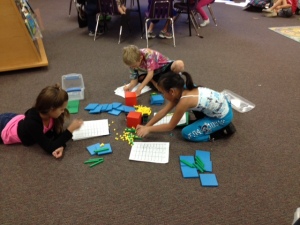
In the afternoons we have more “content” area subjects (i.e. math and language arts). In the primary grades this means students building the skills they need to support their inquiry. In the intermediate grades this means honing those skills for better communication and more thorough inquiry. Again, we don’t work from a boxed curriculum. We find the lessons, approaches, and materials that work for the individual student. Sometimes this means working with manipulatives, sometimes it means exploring measurement outside, and sometimes it means using an app. It changes daily based on the needs of the students.
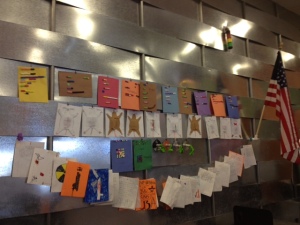
We have mixed age level classrooms. We do this for a lot of reasons. Most importantly, it is good for older and younger students to work together and learn from each other; it is vital that a child be able to work at their developmental level and progress as they are ready to; and it deepens inquiry when students with different perspectives work together.
Once every five weeks we invite the parents to join us for Parent University. This is a time for us to help parents understand this new way to do school. Detox, if you will. It is a time for us to show parents what best practices in education look like, why grades aren’t all they are cracked up to be, why play is important. It is a time for us to think and laugh together. It is a time to get questions answered.
Also every five weeks, we hold a “Meeting of the Minds”. This is a parent/teacher/student conference where we all get together and set our road map for the next 5 weeks. Students write goals with the help of their teacher. They have ownership over what they have done the last 5 weeks and tell mom and dad what they have planned for upcoming 5 weeks.
Every Friday we have a learning excursion or an opportunity for an “Anastasis Serves”. Learning excursions are field trips all over the place that help students start to recognize that learning doesn’t just happen when we are at school. Learning happens everywhere we are and, if we are paying attention, all the time. Anastasis Serves is a time for our students to give back to the global community. Sometimes this is a door-to-door scavenger hunt for donations, sometimes this is learning about orphans around the world, or packaging cookies and letters to send to our troops.
We don’t do grades, we do assessment all day every day while we learn. We don’t do homework, we pursue our families and passions at home. We don’t do worksheets, we do interesting (sometimes frustrating) work. We don’t do boxed curriculum, we do on-demand learning.
We do mistakes. We do community. We do collaboration. We do messy. We do play. We do fun. We do technology. We do learning.
How do we do all this? We have a 12 to 1 student teacher ratio (or less). We have incredible students, parents and teachers. We have stinking smart board members who are invested in our success and trust our judgement calls. We set our tuition at $8,000 (per pupil spending in our district) to show that even though we are private, this can be done in the public schools. We started with nothing…well almost nothing, we had dreams. There was no capital raised, no fund-raisers, no huge donation. We started the beginning of the year at $0 and put blood, sweat and tears into it.
This is not to say that we have it all figured out, that all of our students are perfect, that all of our staff or families are perfect. We are perfectly imperfect as every school is. We have days when the kids are BOUNCING off the walls, we have disagreements, tired teachers, stressed parents, a founder who has occasional melt downs (that would be me), students who need extra love and support, tight budgets, parents who demand different, scuffles, sniffles and band-aids…lots of band-aids. There is nowhere else I would rather be. No other group of people I would rather work with. No other students whose germs I would rather share. This is my dream.
There are moments throughout the day when I am stopped in my tracks by the realization-this is my dream.
How to integrate Quixey into the classroom: If you or your students use ANY of the above platforms, Quixey is a must! Hunt down the exact app you need quickly and easily. Have a mixed platform classroom? Quixey makes it simple to see where app crossover is possible for the classroom. This is one handy search engine!
Be sure to bookmark Quixey on classroom computers for easy access to an anytime search. When you find an app you are interested in, click for more information, screen shots of the app and a link to the app store. You can even tweet the app out or share it on Facebook!
Tips: When you click on an app, Quixey will even redirect you to the appropriate app store for download!
Please leave a comment and share how you are using Quixey in your classroom!
How to integrate Word Dynamo into the classroom: Word Dynamo is an easy fit into any classroom k-12. This is a great addition to your language arts, math, economics, science, history, (ANY) classroom. Word Dynamo gives students the keys to their own learning by working with them at their own level. It would be wonderful to use Word Dynamo throughout the year to keep kids playing with words. Students will love watching their own “estimated words you know” score creep up and up over the course of the school year. Vocabulary is one of those things that students don’t always realize that they are learning throughout the school day. Then *bam* they wake up one day and suddenly know a whole LOT of words.
The games and practice items on Word Dynamo make for a great vocabulary center on classroom computers during language arts. But, as I mentioned before, my very favorite part is the ability for students to create their own lists. At Anastasis, we have students constantly adding to their own spelling/vocabulary list as they come across new words they want to learn. I like that Word Dynamo give them a place to keep, practice and play with these words. Students have ownership over their own learning and aren’t stuck practicing and testing on the words they already know. Do you assign spelling and vocabulary words each week? Let students enter those words in their custom list to practice!
Because Word Dynamo is constantly utilizing the feedback it gets from students, it is constantly challenging them and urging them on to a new personal best. Students can watch their score go up, engage in challenges, and choose fun games that keep them learning. In other words, this is a site you are going to want to have handy for your students!
Don’t have the opportunity for students to use Word Dynamo on their own account/computer? Put up a challenge on the interactive whiteboard or projector-connected computer. As students enter the classroom, they can each answer a question on the way to their seats. Keep track of the number of words that the whole class knows.
Tips: The Quick Tour will lead you through all the Word Dynamo goodies and have you ready to use it with your students in no time! Word Dynamo looks and works well on the iPad and iPod Touch browser…great for vocabulary practice anywhere.
Please leave a comment and share how you are using Word Dynamo in your classroom!
You are really going to do this? You are going to make me BEG you to share? If that is what it takes, that is what it takes! The November issue of Project PLN is about ready…it is just missing one last thing, a post from YOU.
We would be honored to have YOU (yes you) participate in the November issue of Project PLN. Here is how:
In November, we are having a #SchoolDidAGoodThing issue. We want people to share the stories of how school did a good thing for them. These stories serve as an inspiration to teachers and the community. It is a nice reminder of why we all do what we do. We really hope you will share a story with us about how school did a good thing. Share a blog post you’ve already written, something you remember from when you were in school, something original you just have to say. This issue is a great way to say THANK YOU to those who have impacted our lives and to our colleagues who change lives every day. Lets come together and share all the ways that schools do a good thing each and every day!
As always, feel free to email posts to ProjectPLN10@Gmail.com, check in on us at Twitter @ProjectPLN or say hello on Facebook.
How to integrate ABC Mouse into the classroom: ABC Mouse is a fun website. Activities in ABC Mouse are fantastic for center use in a one-two computer classroom (or more). The activities and games are short enough for a center activity that students can cycle through.
For kindergarten students in a computer lab, this is a great site to get their feet wet with the technology at the beginning of the year. I often started my students on fun academic sites like Starfall.com where students could practice clicking, navigating, dragging/dropping, etc. These type of sites build students computer confidence, improve their fine motor skills and provide them with content area learning at the same time. I wish this site had existed when I was teaching kindergarten computer!
If you don’t have access to computers for the students but have an interactive whiteboard or projector-connected computer, students can take turns interacting with the ABC mouse activities. The books make great class read along stories on the big screen!
ABC Mouse is a fun way to introduce new concepts/skills, as a place for students to practice concepts/skills, or for review.
Tips: If you aren’t at a public school, sign up for the sample content…the private school dollar amount is reasonable!
Please leave a comment and share how you are using ABC Mouse in your classroom!
How to integrate Moglue into the classroom: I think tools that make content creation simple are absolute genius. As much as I would love for every student (and myself) to know how to program, it takes quite a bit of know-how before students can make their stories and ideas come to life. The intuitive interface of tools like Moglue let students focus on breathing life into their creations and not on the technology tools used to build them. Tools like Moglue are wonderful for the classroom where students are often short on time and resources (someone to teach them programming). Because the interface is so easy to use, students can focus on telling a story, releasing their inner artist, and letting their creativity shine.
Students (or classes) can use Moglue to:
Tips: The Moglue builder can be downloaded on Mac or Windows computers and has a great tutorial to get your students started!
Please leave a comment and share how you are using Moglue in your classroom!